AWS Technical Essentials
Learn AWS the way it's actually used at work — 40+ hands-on labs in your own account, finishing with a full multi-tier architecture you design and deploy yourself.

Built to make you useful on AWS, not just familiar with it
Most beginner courses stop at explaining what a service does. This one has you build with it, break it, and fix it.
Labs, not slideshows
More than 40 lessons are step-by-step builds you follow in your own AWS account — VPCs, load balancers, auto scaling, IAM roles, EBS, Lambda.
Safety rails from lesson one
Before anything else you'll set up MFA and a billing alarm, so you can experiment freely without an unexpected invoice.
Networking taught properly
Four full lessons on IP addressing, ports and subnetting before you touch a VPC — the gap that trips up most self-taught engineers.
A real architecture at the end
The capstone takes you from a business brief through HLD and LLD to a live, highly available multi-tier application.
Ask me directly on Slack
Every student joins the IaaS Academy Slack workspace. Stuck on a lab at 11pm? Post it. I answer, not a bot and not a teaching assistant.
Certificate of completion
Submit your capstone for personal feedback and receive a certificate you can share with employers and clients.
Your first real week in the cloud
AWS Technical Essentials is the ground floor. It assumes you've never opened the AWS console, and by the end it has you designing and deploying a highly available application across multiple availability zones.
The path runs in the order things actually depend on each other: secure your account, understand identity and permissions, learn how storage works, then networking, then compute, then databases, then the tooling that keeps it all running. Nothing is introduced before the thing it rests on.
Every concept is followed by a lab. You'll create IAM policies and test them, build a custom VPC with public and private subnets, connect to an instance you deliberately made unreachable from the internet, encrypt an EBS volume, put an application behind a load balancer, and watch an auto scaling group replace an instance you just terminated.
It's the foundation the Cloud Practitioner and Solutions Architect certifications are built on — and, more usefully, the foundation your first cloud role is built on.
Skills you'll walk away with
One brief. One architecture. Built by you, end to end.
The Vegan Studio needs a recipe contest web application that stays up when things fail. You get the business requirements, and then you do what an architect does: produce the high-level design, work it into a low-level design, and build it in your own AWS account.
Fourteen guided project lessons take you from the brief to a running, publicly reachable application — then to deliberately breaking it, to prove the failover works.
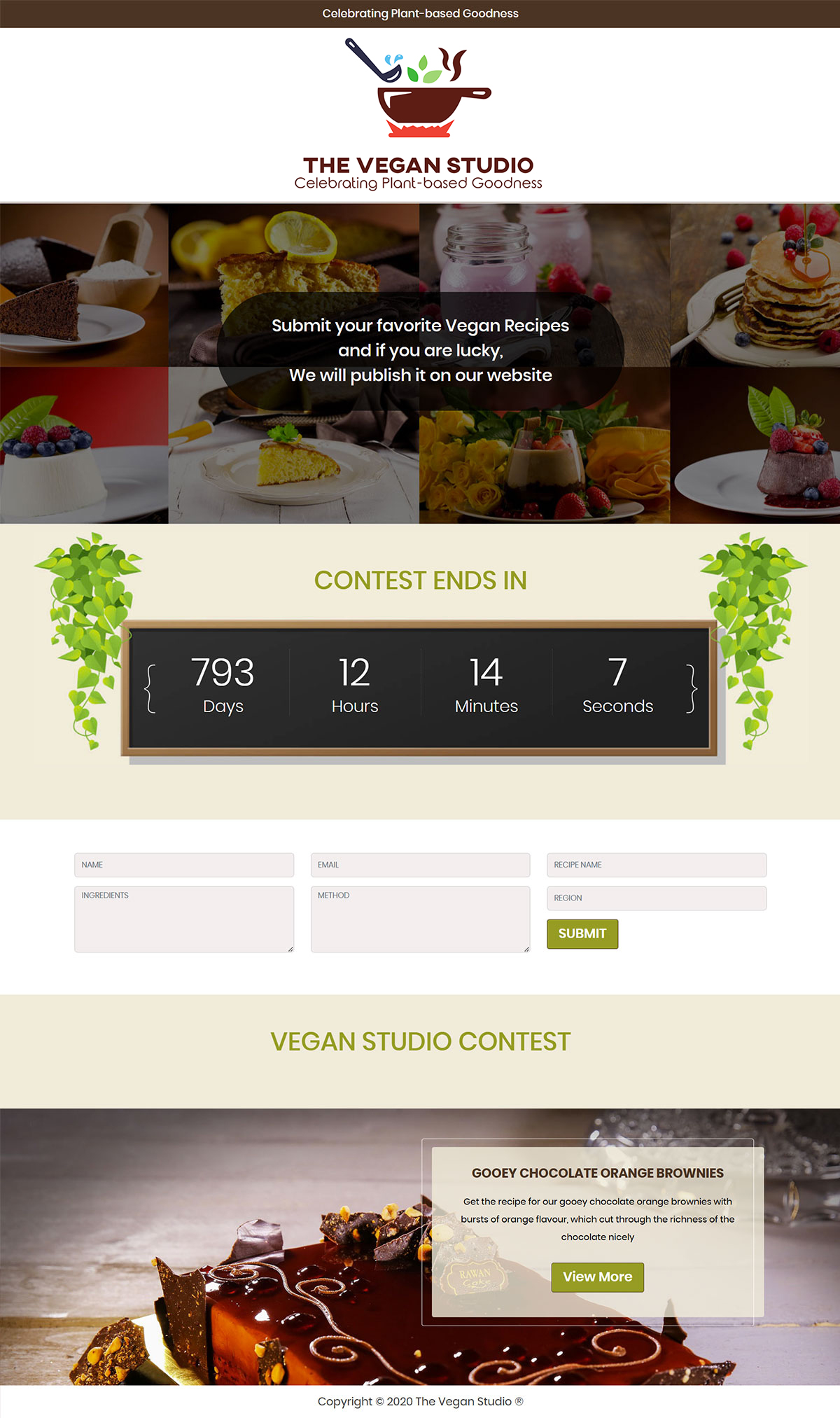
The application you'll deploy
Multi-tier
Web and data tiers separated across public and private subnets
Highly available
EC2 in an auto scaling group behind an Application Load Balancer
Multi-AZ database
Amazon RDS MySQL handling full CRUD operations
Least privilege
IAM roles and security group rules scoped to what's actually needed

The same course on a marketplace is not the same course
Two things you cannot get through a marketplace listing, at any price.
Enrolling at IaaS Academy
- Direct Slack access to me. Ask questions and get answers from the person who built the course.
- Updates land here first. When AWS changes and I re-record, students here get it immediately.
- Personal capstone feedback on the architecture you submit.
- One price, always. No countdown timers, no waiting for a sale.
Buying through a marketplace
- A public Q&A queue, answered whenever it's answered.
- Updated versions arrive after they've shipped here.
- No one reviews your project work.
- The platform decides the price and when you see it.
Eight sections, 91 lessons, in dependency order
Several lessons in section 1 are free to preview before you enrol.
1
Introduction to AWS and the Cloud
10 lessons · 47 min
Create your development account, lock it down with MFA, and set a billing alarm before you spend anything. Then the fundamentals: what cloud computing changes, the six advantages, and how the AWS global infrastructure of regions, availability zones and edge locations fits together.
3 labs
2
Identity and Access Management
10 lessons · 2h 21m
Which identity service to use and when. The root user and why you stop using it. Users, groups, password policies, and a long look at how IAM policies are actually evaluated. Then labs: assigning policies, CLI access, cross-account roles, and resource-based policies.
4 labs
3
Amazon S3 and Object Storage
8 lessons · 2h
Block, file and object storage compared, then S3 in depth — storage classes and what each one costs you, versioning, cross-region replication, and static website hosting. Five of the eight lessons are hands-on.
5 labs
4
Networking and Amazon VPC
15 lessons · 4h 7m
The section most courses skip. Four lessons on IP addressing, ports and subnetting first, so CIDR blocks make sense before you build. Then a custom VPC from nothing: subnets, internet gateway, route tables, NAT gateway, NACLs and security groups.
6 labs
5
Compute Services on AWS
21 lessons · 5h 19m
The largest section. EC2 instance types and pricing models, reaching an instance in a private subnet, EBS volume types and encryption, building an AMI and launching from it with user data. Then load balancers, auto scaling groups, and a first look at serverless with a Lambda and EventBridge automation.
11 labs
6
Databases on AWS
6 lessons · 54 min
Relational databases on AWS and where RDS fits. Launch an instance, then work through Multi-AZ deployments, automatic and manual backups, and read replicas — the pieces the capstone depends on.
1 lab
7
Management and Governance
7 lessons · 2h 2m
How you actually operate an environment. CloudWatch metrics and dashboards, Trusted Advisor, Systems Manager Run Command and Session Manager for access without SSH keys, and Secrets Manager for credentials that shouldn't be in your code.
1 lab
8
Capstone Project: The Vegan Studio
14 lessons · 1h 47m
Setting the scene, then the high-level design requirements and the architectural solution. Build it out: VPC and networking, an S3 resource bucket, IAM roles, Multi-AZ RDS, an Application Load Balancer and auto scaling. Access the running application, run two failover tests, and clean up so nothing keeps billing.
Full buildBuilt for people starting out
No AWS experience required. Basic computer literacy is enough — the networking you'll need is taught from first principles.
Career changers
Moving into cloud from another field and needing a credible, structured first step with something to show at the end.
Students & graduates
Building the foundation that certifications and interviews both assume you already have.
IT professionals
Support engineers, sysadmins and developers who work near AWS and want to work in it.

About your instructor
Rajesh is a senior solutions architect and corporate trainer with over 20 years of experience in core IT infrastructure and cloud computing, specialising in AWS and Microsoft 365. He has delivered training programs for clients across the UK, USA and India, and has published multiple AWS certification guides with Packt.
As the instructor behind IaaS Academy, Rajesh teaches through real-world labs and case studies — and answers student questions personally in the course Slack workspace.
One price. Everything included.
AWS Technical Essentials
Cloud fundamentals, hands-on, with a capstone project
Instalment options available at checkout.
- 91 video lessons · 19 hours across 8 sections
- 40+ guided labs in your own AWS account
- The Vegan Studio capstone project, HLD to deployment
- Downloadable resources and design templates
- Slack access to your instructor
- Personal feedback on your capstone submission
- Certificate of completion
- Future updates included, released here first
Secure checkout · Card and UPI accepted
Before you enrol
Do I need any AWS or IT experience?
No AWS experience at all. The course starts by creating an account and explains every concept from the ground up, including the IP addressing and subnetting most courses assume you already know. If you're comfortable using a computer, you can follow it.
Will running the labs cost me money on AWS?
Most labs run inside the AWS Free Tier. A few resources used in the capstone — NAT gateways and Multi-AZ RDS in particular — do carry a small charge while they're running. That's why lesson 1-3 has you set a billing alarm, and why the final capstone lesson is a full clean-up walkthrough.
How does the Slack support work?
After enrolling you'll get an invitation to the IaaS Academy Slack workspace. Post your question in the course channel with a screenshot if it helps, and I'll answer it myself — usually within a working day.
Is this the same as the Cloud Practitioner course?
No. Technical Essentials teaches you to build on AWS; the CLF-C02 course is structured around passing a specific exam. Essentials goes deeper on hands-on work and gives you a portfolio project, which makes it a strong foundation before or alongside certification study.
How long do I have access?
Lifetime. That includes any future updates to the course, which are always released here before anywhere else.
Can I pay in instalments?
Yes — an instalment option is available at checkout alongside the one-time payment.
Start building this week
91 lessons, 40+ labs, a full multi-tier capstone, and direct access to your instructor — for $9.99.
Enrol for $9.99Lifetime access · Updates included · Instalment options at checkout
Course Curriculum
- Welcome to the course (3:50)
- About your instructor (1:13)
- DO THIS FRST: Download Resources
- Setting up your environment (2:06)
- Lesson 1-1 Lab - Create an AWS account for Development (6:46)
- Lesson 1-2 LAB - Protect your AWS account with MFA (5:40)
- Lesson 1-3 LAB - Create a billing alarm (5:44)
- Lesson 1-4 Introduction to Cloud Computing (5:33)
- Lesson 1-5 The Six Advantages of Cloud Computing (4:29)
- Lesson 1-6 The AWS Global Infrastructure (11:42)
- Lesson 2-1 Which IAM identity service should you use? (34:16)
- Lesson 2-2 AWS Root User (4:30)
- Lesson 2-3 IAM password policies (3:37)
- Lesson 2-4 IAM users and groups (8:53)
- Lesson 2-5 - How IAM policies work (25:09)
- Lesson 2-6 LAB - Create and assign IAM Policies (9:23)
- Lesson 2-7 LAB - Access your AWS account using CLI (18:45)
- Lesson 2-8 LAB - Create IAM role for cross-account access (19:48)
- Lesson 2-9 LAB - Resource based policies (11:40)
- Lesson 2-10 IAM Security Tools (4:55)
- Lesson 3-1 Storage types on AWS (8:50)
- Lesson 3-2 Introduction to Amazon S3 (12:37)
- Lesson 3-3 Amazon S3 Storage Classes (23:25)
- Lesson 3-4 LAB - Create an Amazon S3 Bucket (12:24)
- Lesson 3-5 LAB - Amazon S3 Versioning (16:04)
- Lesson 3-6 Amazon S3 Replication (12:07)
- Lesson 3-7 LAB - Configure Amazon S3 Replication (18:12)
- Lesson 3-8 LAB - Amazon S3 Static Website Hosting (15:58)
- Lesson 4-1 IP Addresses and Port Numbers Part 1 (18:28)
- Lesson 4-2 IP Addresses and Port Numbers Part 2 (12:03)
- Lesson 4-3 IP Addresses and Subnetting Part 1 (12:16)
- Lesson 4-4 IP Addresses and Subnetting Part 2 (31:08)
- Lesson 4-5 Introduction to Amazon VPC (12:37)
- Lesson 4-6 Custom VPCs on AWS (29:59)
- Lessn 4-7 LAB - Create a Custom VPC (12:35)
- Lesson 4-8 LAB Adding Subnets to your VPC (25:26)
- Lesson 4-9 LAB Create an Internet Gateway (9:10)
- Lesson 4-10 LAB - VPC Route Tables and Internet Access (15:11)
- Lesson 4-11 Introduction to NAT Gateways (22:47)
- Lesson 4-12 LAB - Create a NAT Gateway (6:26)
- Lesson 4-13 AWS Network Access Control Lists (NACLs) (15:22)
- Lesson 4-14 AWS Security Groups (14:05)
- Lesson 4-15 LAB - Configure Security Groups (9:11)
- Lesson 5-1 Introduction to Amazon EC2 (9:16)
- Lesson 5-2 All About EC2 Instance Types (8:24)
- Lesson 5-3 LAB - Launch an EC2 Instance (25:23)
- Lesson 5-4 LAB - Connecting to EC2 Instance in Private Subnet (9:20)
- Lesson 5-5 EC2 Pricing Options (25:34)
- Lesson 5-6 AWS Elastic Block Store (6:34)
- Lesson 5-7 AWS EC2 Instance Store Volumes (4:52)
- Lesson 5-8 AWS EBS Volume Types Part 1 (13:00)
- Lesson 5-9 AWS EBS Volume Types Part 2 (5:23)
- Lesson 5-10 LAB - Working with EBS Volumes (33:01)
- Lesson 5-11 LAB - AWS EBS Encryption (8:39)
- Lesson 5-12 LAB - Create an AMI (14:32)
- Lesson 5-13 LAB - Launch and EC2 Instance using AMI and Scripts (15:56)
- Lesson 5-14 Amazon Elastic Load Balancers (ELBs) (27:31)
- Lesson 5-15 LAB - Deploy an Application Load Balancer (17:52)
- Lesson 5-16 Introduction to EC2 Auto Scaling (21:50)
- Lesson 5-17 LAB - Configure an Auto Scaling Group Part 1 (5:59)
- Lesson 5-18 LAB - Configure an Auto Scaling Group Part 2 (29:53)
- Lesson 5-19 Introduction to Serverless (5:40)
- Lesson 5-20 Introduction to AWS Lambda (4:55)
- Lesson 5-21 LAB - Start and Stop EC2 Instance with AWS Lambda and EventBridge (25:14)
- Lesson 6-1 Introduction to Relational Databases on AWS (15:28)
- Lesson 6-2 Overview of Amazon RDS (7:02)
- Lesson 6-3 LAB- Launch and RDS Instance (9:20)
- Lesson 6-4 Multi-AZ Options on Amazon RDS (7:10)
- Lesson 6-5 Automatic and Manual Backups for RDS (9:00)
- Lesson 6-6 Amazon RDS Read Replicas.mp4 (5:48)
- Section 7-1 Amazon CloudWatch (11:28)
- Lesson 7-2 LAB - Create an AWS CloudWatch Dashboard (13:39)
- Lesson 7-3 AWS Trusted Advisor (7:25)
- Lesson 7-4 AWS System Manager Run Command (22:15)
- Lesson 7-5 AWS Systems Maager Session Manager - Part 1 (24:55)
- Lesson 7-6 AWS Systems Maager Session Manager - Part 2 (28:41)
- Lesson 7-7 Introduction to AWS Secrets Manager (13:21)
- Project 8-1 The Vegan Studio - Setting the Scene (4:27)
- Project 8-2 The Vegan Studio - High Level Design Requirements (HLD) (7:34)
- Project 8-3 The Vegan Studio - Architectural Design & Solution (LLD) (14:53)
- Project 8-4 The Vegan Studio - High Availability & Failover Tests (3:19)
- Project 8-5 The Vegan Studio - VPC & Networking (16:00)
- Project 8-6 The Vegan Studio - Amazon S3 Resource Bucket (5:16)
- Project 8-7 The Vegan Studio - IAM Roles (8:38)
- Project 8-8 The Vegan Studio - Amazon RDS Multi-AZ (8:45)
- Project 8-9 The Vegan Studio - Application Load Balancer (7:52)
- Project 8-10 The Vegan Studio - Auto Scaling Configuration (11:58)
- Project 8-11 The Vegan Studio - Access the Web Application (4:12)
- Project 8-12 The Vegan Studio - HA and Failover Test Part 1 (4:39)
- Project 8-13 The Vegan Studio - HA and Failover Test Part 2 (4:22)
- Project Task 8-14 The Vegan Studio - Project Clean Up (5:09)